Submitting Bug Reports
How to report a bug in Music Speed Changer for Android: what details to include and how to send us the audio file that causes it.

Please help us fix bugs by telling us about them! To reproduce a problem, we need:
- your device model (for example, Pixel 9a or Galaxy A54),
- your Android version,
- the audio file that causes the problem, and
- ideally, a screen recording of the problem (helpful, but not required).
Sending a File Directly from the App
The quickest way to send us the track is from the editor.
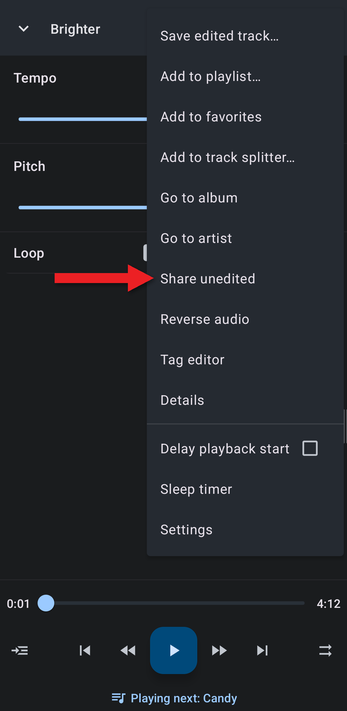
- Play the track and open the editor, then tap the ⋮ menu and choose Share unedited.
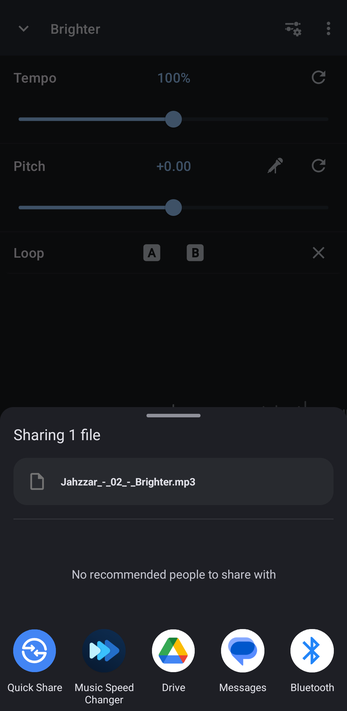
- Choose your email app from the share sheet.
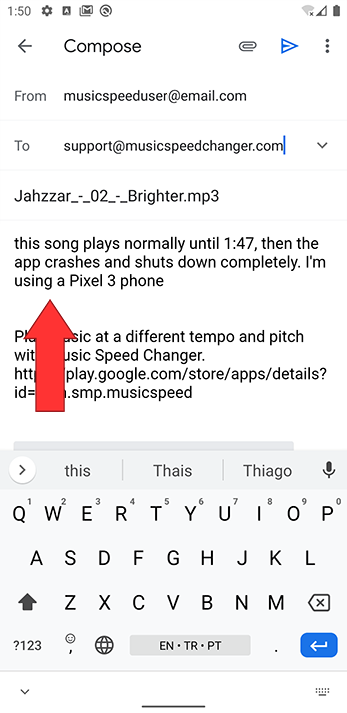
- Send it to support@musicspeedchanger.com. In the message, describe the problem and tell us your device model and Android version.
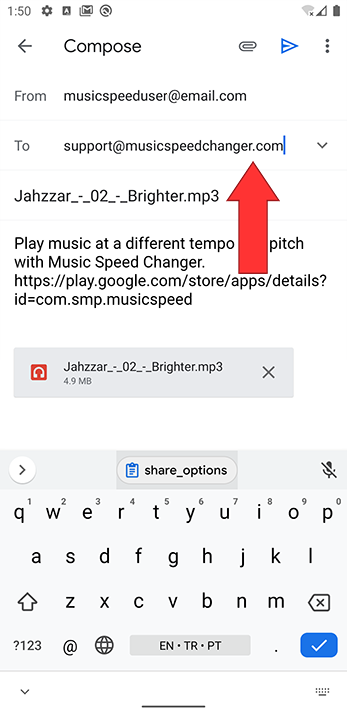
You can also simply email the file to support@musicspeedchanger.com from your computer or phone.
Why the Details Matter
We depend on your reports to find bugs that only happen with certain files, settings, Android versions and devices. Often we hear about a problem we can't reproduce on our own devices. We want to fix every problem, and the more you tell us, the more likely we can reproduce it and fix it.
Please describe exactly what happens and what you were doing, including any settings you had changed. For example:
- "When I change the tempo after changing the pitch, I hear a pause and then crackling. This file causes it on my Galaxy S8 with Android 9."
- "This song plays normally until 1:47, then the app closes. I'm using a Moto G4."
- "With Flanger and Echo turned on, the app freezes when I change the pitch of this track on my Galaxy Note 10."
Many problems are caused by the way a particular file was encoded, or by small errors in the file, so an exact copy of the file that causes the problem is essential.
How did we do?
Static, Crackling or Skipping During Playback
Making a Screen Recording of a Bug
