Static, Crackling or Skipping During Playback
Fix static, crackling or skipping in Music Speed Changer for Android by lowering sound quality, raising the buffer size or re-saving the file.

Changing tempo and pitch takes a lot of processing. On some devices, especially older or slower ones, this can cause static, crackling, dropouts or glitches. Lowering the processing load usually fixes it.
Fixing Static and Crackling
First, make sure you have the latest version of Music Speed Changer from Google Play. Then open the app menu (☰), tap Settings, scroll to the bottom and tap Advanced. Try these changes one at a time:
- Set Time stretch sound quality to Low or Efficient.
- Set Processing buffer size to a larger value, up to 20480.
- Untick Use native audio library.
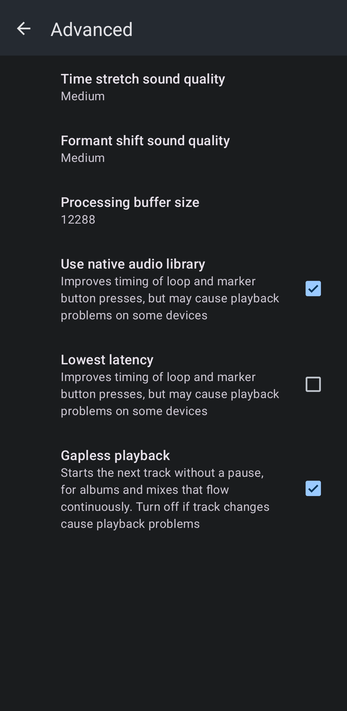
Advanced Audio Settings: Sound Quality, Buffer Size and Latency explains each setting.
If you only hear problems when one track ends and the next begins, try turning off Gapless playback in the same screen.
Skipping in One Particular Track
If a single track skips or jumps, the file itself may have small errors from when it was downloaded or created. Saving a fresh copy often fixes this:
- Play the track and open the editor.
- Tap the ⋮ menu and choose Save edited track…, then tap OK. See Saving Edited Tracks.
- Open the new copy from My Creations and play it instead.
Still Having Problems?
Please let us know, and send us the file that causes the problem. See Submitting Bug Reports.
How did we do?
The App Stops Playing in the Background
Submitting Bug Reports
