The App Stops Playing in the Background
Music Speed Changer for Android stops in the background? Turn off battery optimization for the app and check your phone's own battery settings.

If Music Speed Changer stops playing when the screen turns off or when you switch to another app, your phone's battery optimizer is almost certainly closing it. Many phone manufacturers add aggressive battery savers that shut down apps running in the background, and they often leave only their own pre-installed apps alone.
Turn On "Allow Background Use"
Music Speed Changer has a setting that asks Android to stop optimizing it:
- Open the app menu (☰) and tap Settings.
- Under Device interaction, tap Allow background use.
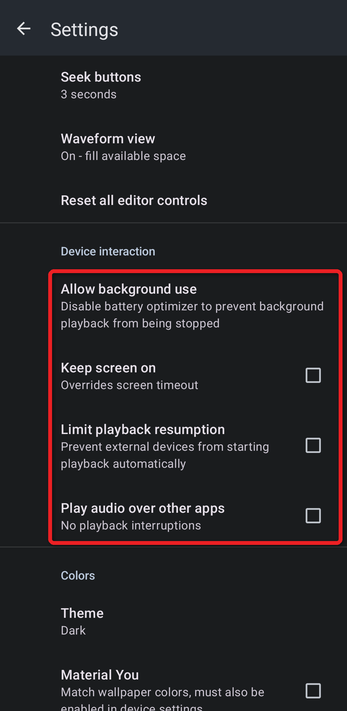
- Read the explanation and tap Device settings. Your phone's battery settings open.
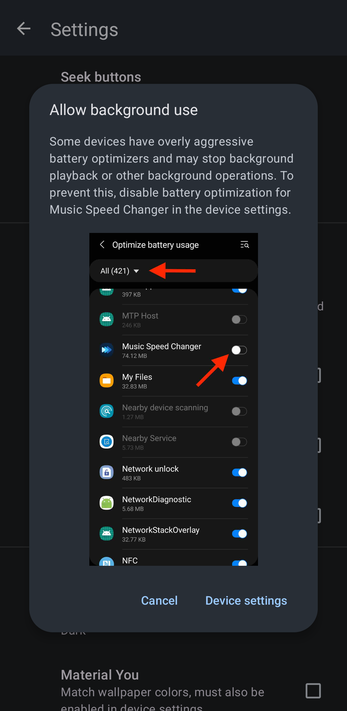
- Find Music Speed Changer in the list and turn off battery optimization for it. Depending on your phone, this may be called "Unrestricted", "Don't optimize" or "Allow background activity".
Check Your Phone's Own Battery Settings
Some manufacturers (for example Samsung, Xiaomi, Huawei, OnePlus and others) have extra battery savers on top of Android's. The steps are different for every brand and model. The independent site Don't kill my app! has step-by-step instructions for each one. (We're not affiliated with it; we've just found its advice helpful for our users.)
Other Causes
- Google Play services updating: occasionally the app stops when Google Play services updates in the background. This is rare if automatic updates are on and your phone isn't switched off for long periods.
- Another app taking over the audio: if the music pauses rather than stops, another app may be asking to play sound. See Playing Audio Over Other Apps.
- The screen turning off: to keep the screen on while you use the app, see Background Use, Keep Screen On and Other Device Settings.
Still having trouble? See Submitting Bug Reports.
How did we do?
Static, Crackling or Skipping During Playback
