Background Use, Keep Screen On and Other Device Settings
Stop background playback being cut off, keep the screen on, and control how Bluetooth devices start playback in Music Speed Changer for Android.

The Device interaction section of Settings controls how Music Speed Changer works with your phone and other devices. Open the app menu (☰) and tap Settings (or tap Settings in the editor's ⋮ menu); it's the second section.
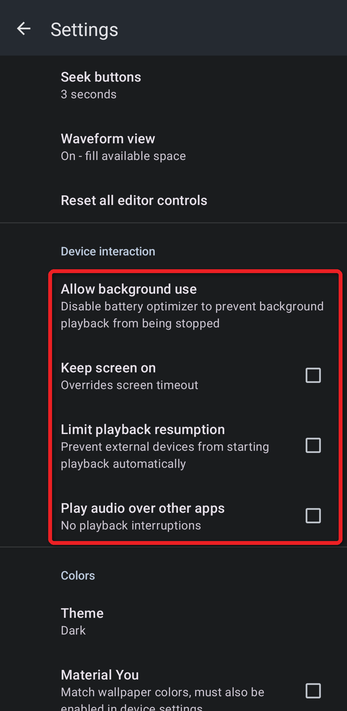
Allow Background Use
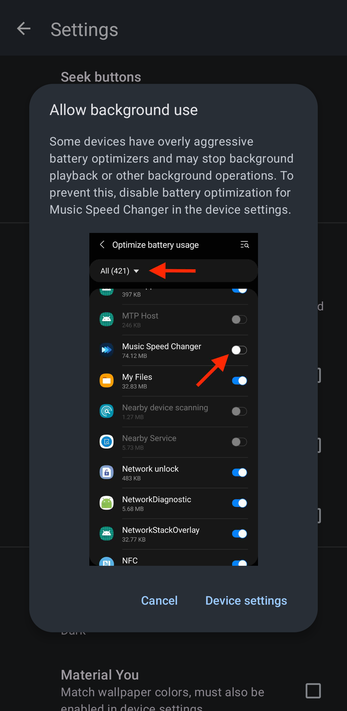
Some phones have aggressive battery optimizers that stop background playback. Tap Allow background use to see how to turn battery optimization off for Music Speed Changer, then tap Device settings to open your phone's battery settings. Find Music Speed Changer in the list and turn off battery optimization for it (the exact wording depends on your phone). If playback still stops, see The App Stops Playing in the Background.
Keep Screen On
Keeps your screen from turning off while the app is open, overriding your phone's screen timeout. Handy when you're practicing and your hands are busy.
Limit Playback Resumption
Stops external devices, such as Bluetooth headphones and car audio systems, from starting playback automatically when they connect.
Play Audio Over Other Apps
Keeps your music playing when another app plays sound, instead of pausing. See Playing Audio Over Other Apps.
How did we do?
Dark Theme, AMOLED Black and Accent Colors
Playing Audio Over Other Apps
