Sleep Timer
Set a sleep timer in Music Speed Changer for Android to stop the music after a set time, and extend or cancel it.

Updated
by Steve Myers
The sleep timer stops playback after a set time, which is handy if you fall asleep listening to music.
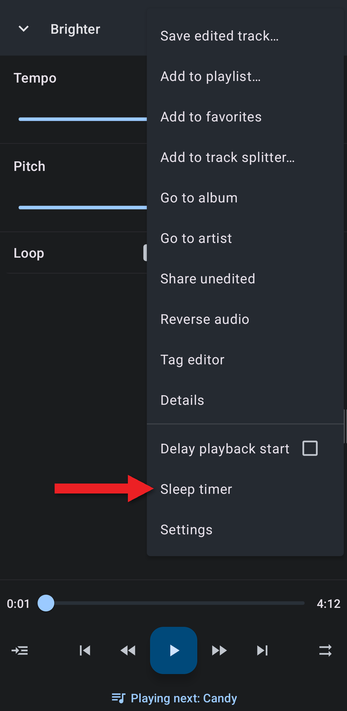
- In the editor, tap the ⋮ menu and choose Sleep timer.
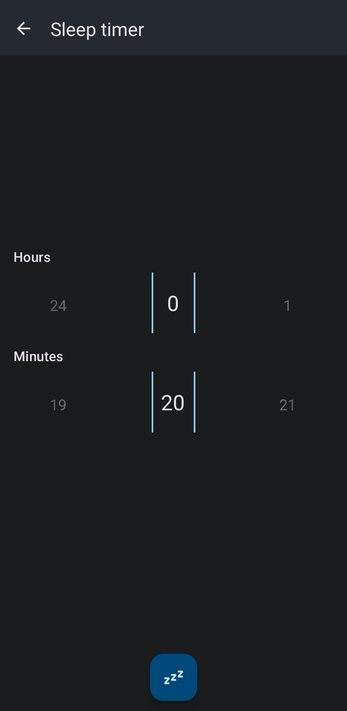
- Swipe the Hours and Minutes wheels left or right to set how long the music should play. The default is 20 minutes. Then tap the round zzz button to start the timer.
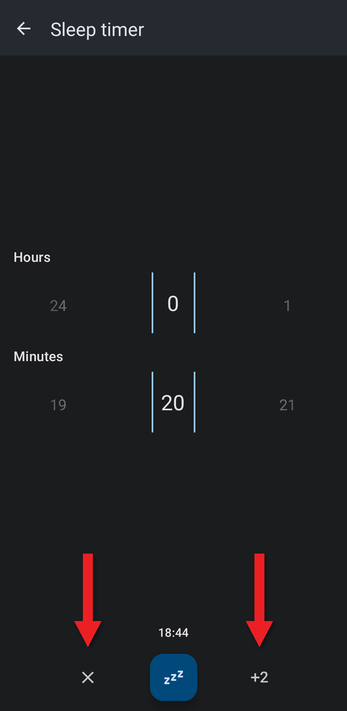
- The countdown appears above the zzz button. Tap +2 to add 2 minutes, or tap ✕ to cancel the timer.
The editor doesn't show that a timer is running. To check how much time is left, or to change or cancel the timer, open Sleep timer from the ⋮ menu again.
How did we do?
Delayed Playback Start (Count-In)
Editor Components Video: Key and BPM, Markers, Equalizer and Effects
