Delayed Playback Start (Count-In)
Turn on a 5-second count-in before playback in Music Speed Changer for Android, so you have time to get ready to play along.

Updated
by Steve Myers
Music Speed Changer can wait 5 seconds before it starts playing. This count-in gives musicians time to get ready to play along, and it's handy whenever you want to press play and then switch to something else before the music starts.
- In the editor, tap the ⋮ menu and tick Delay playback start.
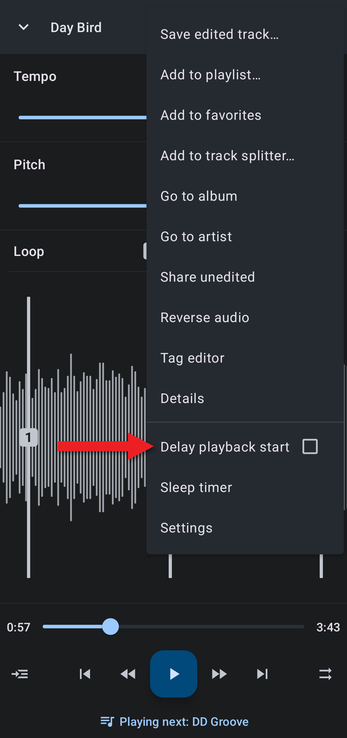
- Now, whenever you start playback with the app's play button, a countdown from 5 appears first, and the music starts when it reaches zero.
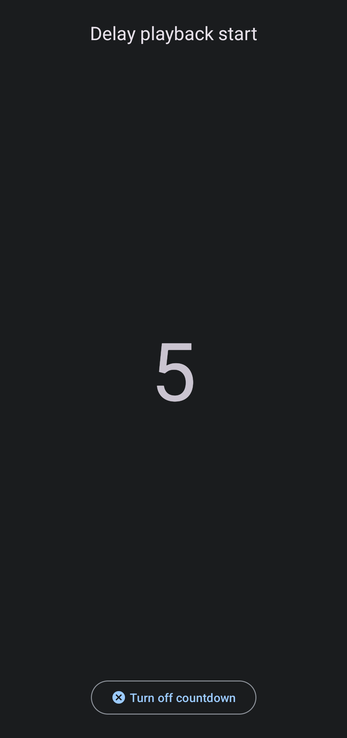
To stop using the count-in, tap Turn off countdown on the countdown screen, or untick Delay playback start in the ⋮ menu.
The count-in only happens when you press play in the app. Play buttons on headphones and other media controls start playback straight away.
See also Tips for Practicing a Musical Instrument.
How did we do?
Track Splitter: Isolating Vocals and Instruments
Sleep Timer
