Ad Consent and Privacy Options (EU and UK)
Change your ad consent choices in Music Speed Changer for Android (EU and UK) with Privacy options and Google's consent form.

Updated
by Steve Myers
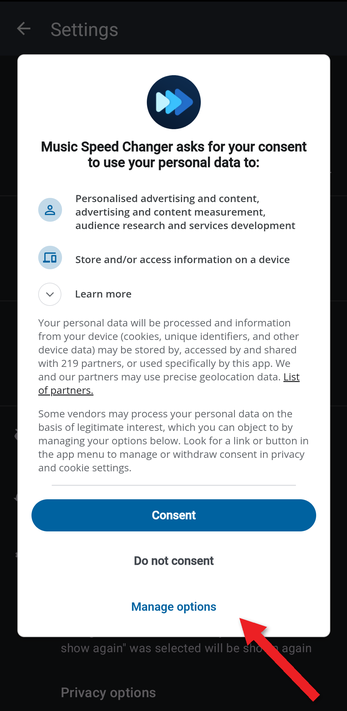
Because of the GDPR and similar laws, users in the European Union, the United Kingdom and some other regions are asked to choose how their data is used for ads. Music Speed Changer uses Google's consent form for this. It appears when you first open the app.
We recommend tapping Consent, so the ads you see are more relevant to your interests. If you'd rather see non-personalized ads, or want to choose in detail, tap Manage options.
If you've upgraded to Pro, you don't see ads, so this doesn't apply to you. See Upgrading to Music Speed Changer Pro.
Changing Your Choices
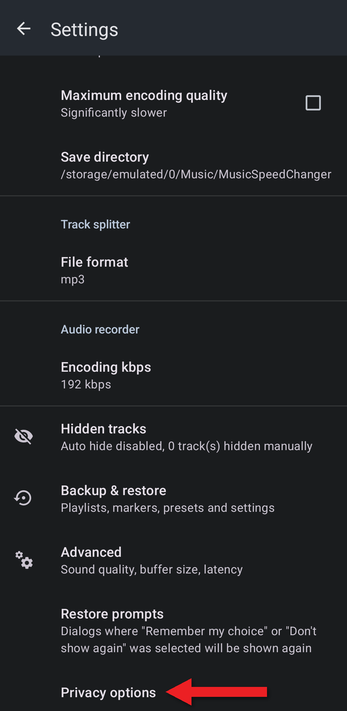
- Open the app menu (☰), tap Settings, and scroll to the bottom. Tap Privacy options.
- The consent form opens. Tap Consent to allow personalized ads, Do not consent to refuse, or Manage options to choose in detail.
- In Manage your data, turn individual purposes and vendors on or off, then tap Confirm choices. (Accept all turns everything on.)
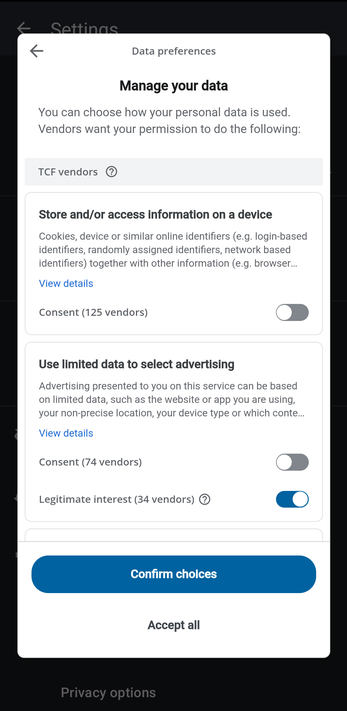
The form is provided by Google, so its wording and the number of partners listed change from time to time.
Related Articles
How did we do?
Making a Screen Recording of a Bug
Deleting Your Data
