Exporting and Importing Playlists
Export playlists from Music Speed Changer for Android as .m3u8 files, import playlists from other apps, and move them to a new phone.

Music Speed Changer can export your playlists as .m3u8 files and share them with other music apps. It also imports playlists that other apps have created on your device automatically.
Exporting a Playlist
- On the Playlists tab of the Library, tap the playlist.
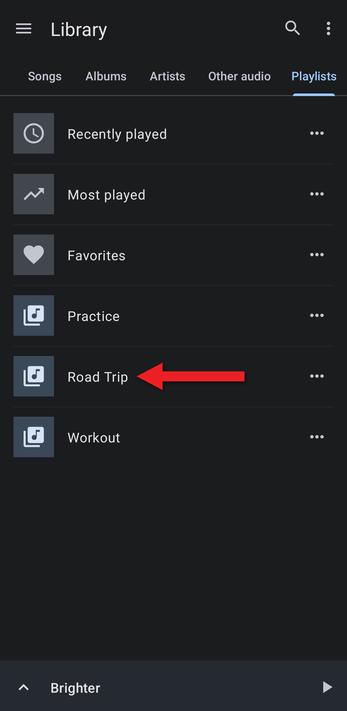
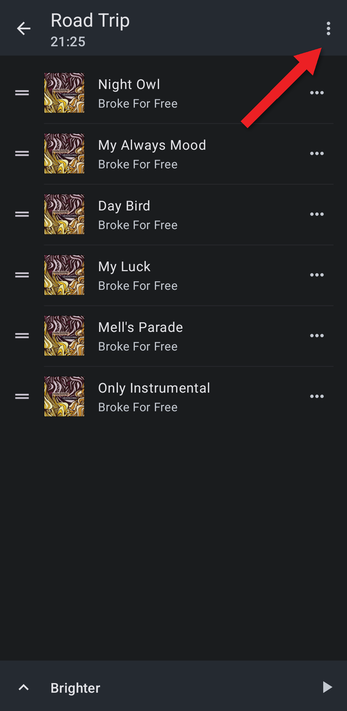
- Tap the ⋮ menu at the top right.
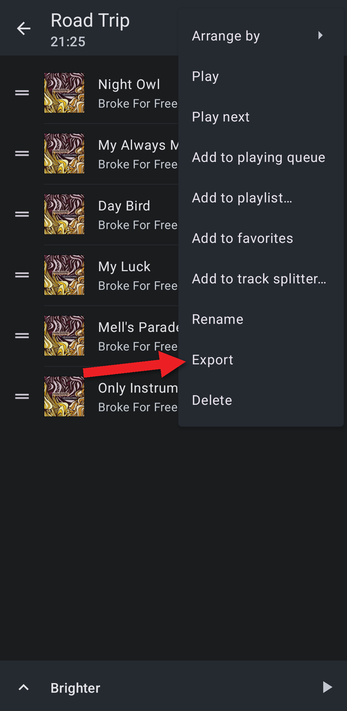
- Tap Export. (You can also choose Export from the playlist's … button on the Playlists tab.)
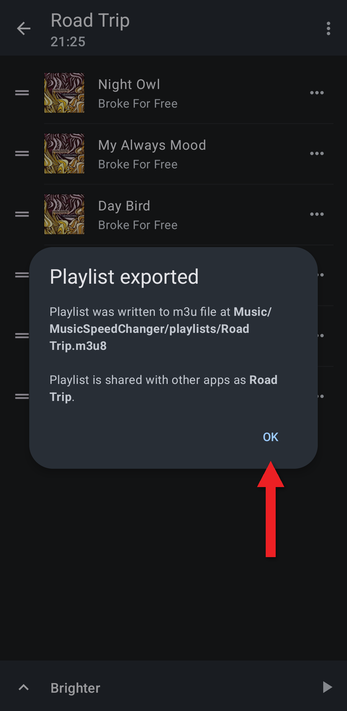
- A message shows where the file was saved: the Music/MusicSpeedChanger/playlists folder on your device's internal storage. The playlist is also shared with other music apps under the same name. Tap OK.
If a playlist with the same name already exists, a number is added to the new file's name.
Importing Playlists
There's nothing to do: each time Music Speed Changer opens, it imports any playlists created by other apps that it hasn't seen before. To import an .m3u or .m3u8 file, copy it to your device (for example, into the Music folder) and open the app. If a playlist doesn't show up, restarting your device makes Android scan for new files.
Moving Playlist Files to Another Device
A playlist file only lists where each song is stored, so it works on another device only if the songs are in exactly the same folders there. If you're switching to a phone of the same model, or one from the same manufacturer that names its storage the same way, keep your music in the same folders as on the old phone (for example, the Music folder on internal storage) and the playlists will work. Memory cards are harder, because each card has its own unique name.
- Copy all your music to the new phone, into folders with exactly the same names.
- On the old phone, export the playlist as described above.
- Using your file manager, find the .m3u8 file in Music/MusicSpeedChanger/playlists and send it to the new phone, for example by email or cloud storage.
- Save the file on the new phone and open Music Speed Changer. The playlist is imported automatically.
For most people, a backup file is simpler, because the app matches your songs even if they're stored in different places.
How did we do?
Creating Playlists and Adding Tracks
Searching for Songs
