Keeping or Resetting Adjustments When a New Track Loads
Choose whether Music Speed Changer for Android keeps, resets or remembers pitch, tempo, EQ and effects for each song when a new track loads.

Updated
by Steve Myers
Music Speed Changer can keep your pitch, tempo, equalizer and effects the same for every track, reset them when a new track starts, or remember separate settings for each track.
- In the editor, tap the ⋮ menu and choose Settings (or open the app menu ☰ and choose Settings).
- Under Editor controls, tap When loading a new track. The current choice is shown below it.
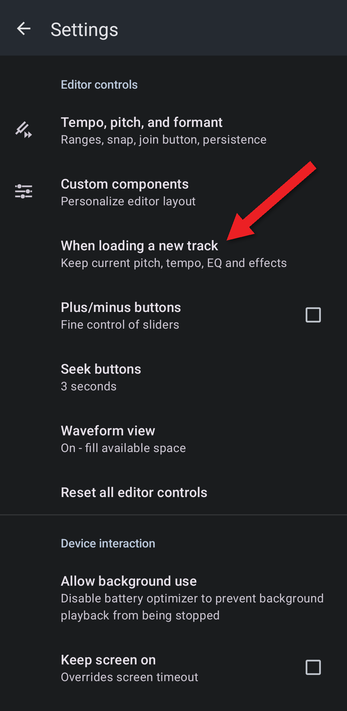
- Choose an option. It applies as soon as you tap it.
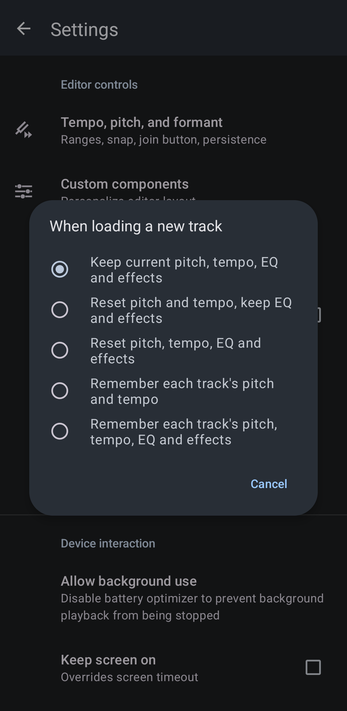
- Keep current pitch, tempo, EQ and effects (the default): everything stays as it is, so you can play your whole library at the same pitch and tempo.
- Reset pitch and tempo, keep EQ and effects: each new track starts at its original pitch and tempo, but your equalizer and effects stay on.
- Reset pitch, tempo, EQ and effects: each new track starts with no adjustments at all.
- Remember each track's pitch and tempo: the app saves the pitch and tempo you last used for each track and restores them the next time it plays.
- Remember each track's pitch, tempo, EQ and effects: the same, including the equalizer and effects.
To reset all the editor controls at once, tap Reset all editor controls at the end of the same Settings section, then tap it again to confirm.
Related Articles
How did we do?
Dark Theme, AMOLED Black and Accent Colors
