Detecting and Changing a Track's BPM
See a song's BPM in Music Speed Changer for Android, fix half or double detection, and change the BPM by adjusting the tempo.

Music Speed Changer detects the tempo of your music in beats per minute (BPM) and shows how the BPM changes as you speed a track up or slow it down.
Showing the BPM
In the editor, tap the Editor components button (the sliders icon at the top right) and choose Key and BPM. The editor then shows the BPM and the musical key along with the tempo and pitch controls.
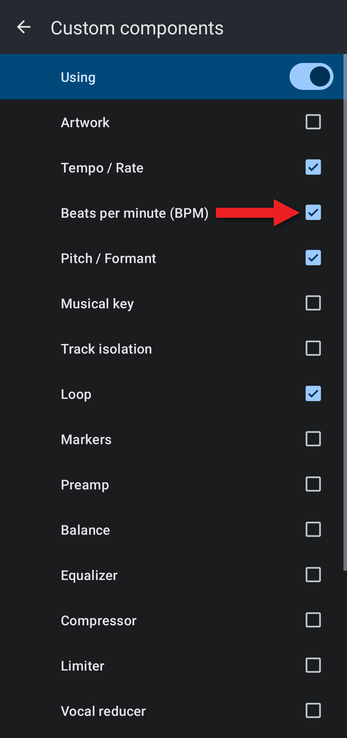
You can also add the BPM to a custom layout: choose Configure custom… in the same menu, turn on the switch at the top, and tick Beats per minute (BPM).
Reading the BPM
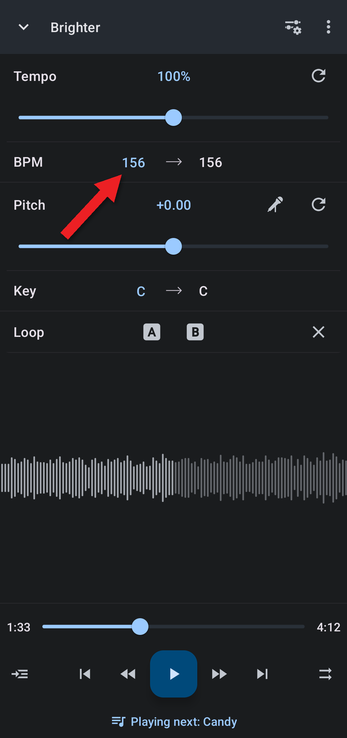
The number on the left is the BPM detected for the track.
Correcting the Detected BPM
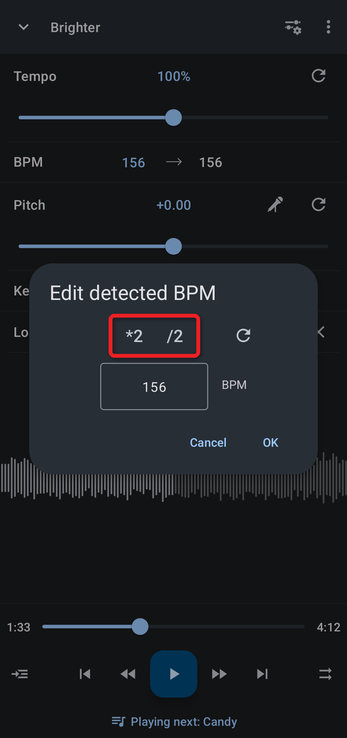
Computer BPM detection sometimes comes out at half or double the tempo a person would count. To correct it, tap the detected BPM on the left. In Edit detected BPM, tap the *2 button to double it or the /2 button to halve it, or type the correct value, then tap OK. The reset button returns to the detected value.
Changing the BPM
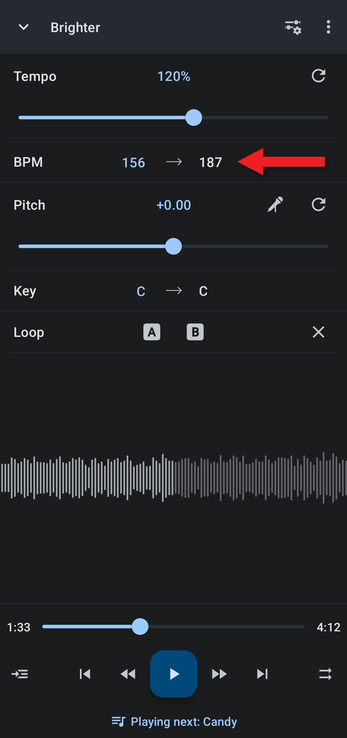
The number on the right is the BPM at your current tempo. Raising the tempo raises the BPM, and lowering it lowers the BPM: at 120% tempo, a 156 BPM track plays at 187 BPM. To reach a particular BPM, drag the Tempo slider or tap the Tempo value and type a percentage (target BPM ÷ detected BPM × 100).
Adjusting Pitch and Tempo Precisely explains the tempo options, and Snapping Loops and Markers to the Beat shows how the app uses the detected beat.
How did we do?
Formant Correction for Natural-Sounding Pitch Shifts
Snapping Loops and Markers to the Beat
