Formant Correction for Natural-Sounding Pitch Shifts
Keep vocals natural when you change pitch with formant correction in Music Speed Changer Pro for Android, and learn what formants are.

Formant correction keeps voices sounding natural when you shift the pitch, and it can also be used for interesting vocal effects. It's included in Music Speed Changer Pro; see Upgrading to Music Speed Changer Pro.
Turning On Formant Correction
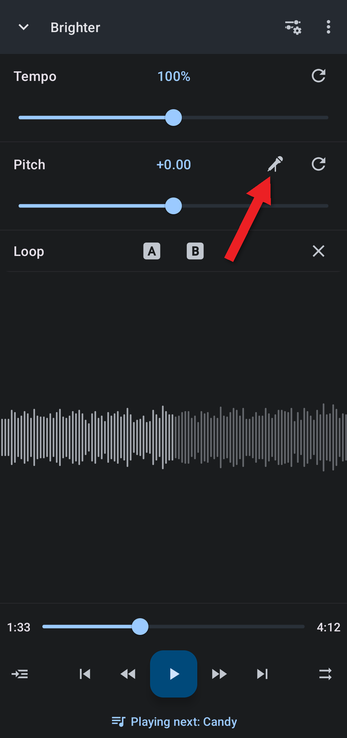
- In the editor, tap the formant button (the microphone icon) on the Pitch row.
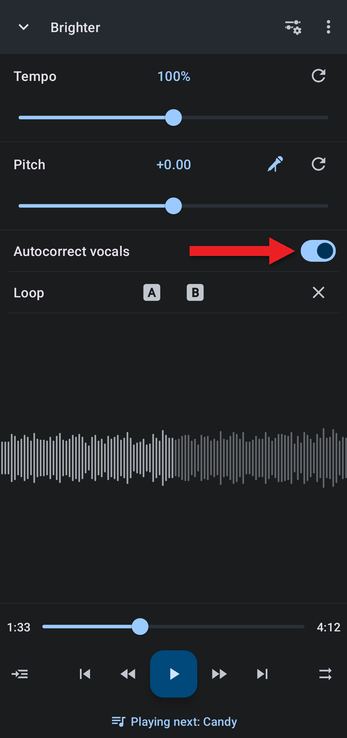
- An Autocorrect vocals switch appears, turned on. Now when you shift the pitch, the formants are automatically shifted the opposite way, so voices keep their natural character. For example, raised vocals no longer sound like chipmunks.
- To control the formant yourself, turn Autocorrect vocals off. A Formant slider appears, starting at the correction that was being applied. Autocorrect sets the formant to the opposite of the pitch shift, but sometimes moving it slightly away from that sounds better. It depends on the song, so experiment!
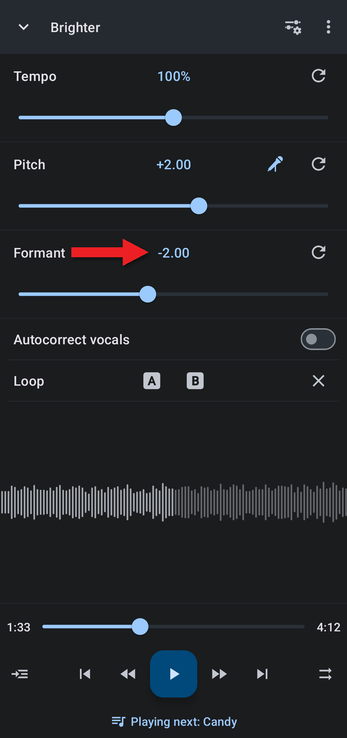
Tap the formant button again to hide the formant controls. You can also turn autocorrect on or off with Join pitch and formant in the Editor components menu.
What Are Formants?
Think of your vocal tract as a tube. When you speak or sing, its shape makes certain frequencies resonate more strongly than others, creating peaks in the sound called formants. Formants give each voice its character, such as whether it sounds deep, bright or nasal.
Why Pitch Shifting Changes the Sound of a Voice
Shifting the pitch of a recording also shifts its formants by the same amount. That's why a voice shifted up sounds like a chipmunk, and a voice shifted down sounds unnaturally deep and boomy: the pitch has changed, but so has the "size" of the singer's vocal tract.
How Formant Correction Works
Formant correction analyzes the audio to find the formants, then moves them independently of the pitch, keeping a natural relationship between the two. In short:
- Analysis: find the location and strength of the formants.
- Pitch shift: move the pitch to the level you want.
- Formant adjustment: move the formants back, or anywhere you choose.
- Synthesis: combine the shifted pitch and formants into the final sound.
What You Can Do with It
- Natural pitch shifts: vocals and instruments keep their original character when you change key.
- Harmonies: create realistic backing harmonies from a pitch-shifted copy of a vocal.
- Creative effects: change the formant on its own to make a voice sound deeper or brighter without changing the notes, or push it to extremes for robot and cartoon voices.
- Sound design: reshape the tone of instruments and other sounds.
The best way to understand formant correction is to try it on your favorite songs and get creative with the formant slider.
How did we do?
The Playing Queue
Detecting and Changing a Track's BPM
