Using an External Equalizer or Effects App
Make an external equalizer, effects app or Dolby Atmos work with Music Speed Changer for Android by turning off the native audio library.

Updated
by Iracy Gomes
Music Speed Changer works with most external equalizer and effects apps. Make sure you have the latest version of Music Speed Changer from Google Play.
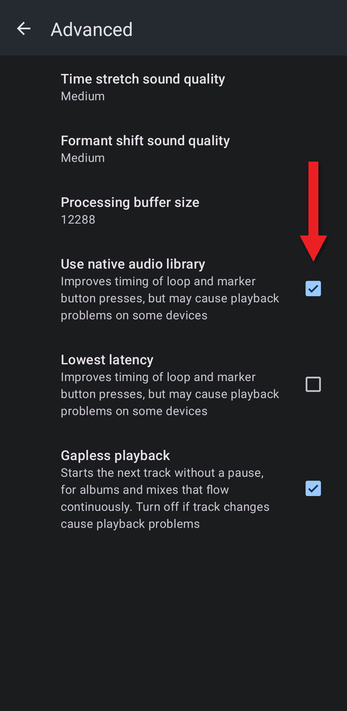
If an external equalizer or effects app has no effect on Music Speed Changer, turn off Use native audio library. The app then plays through Android's standard audio output, which is more compatible with apps that apply effects to all the sound on your device. The same setting helps with Dolby Atmos and other sound enhancements built into some phones.
- Open the app menu (☰) and tap Settings.
- Scroll to the bottom and tap Advanced.
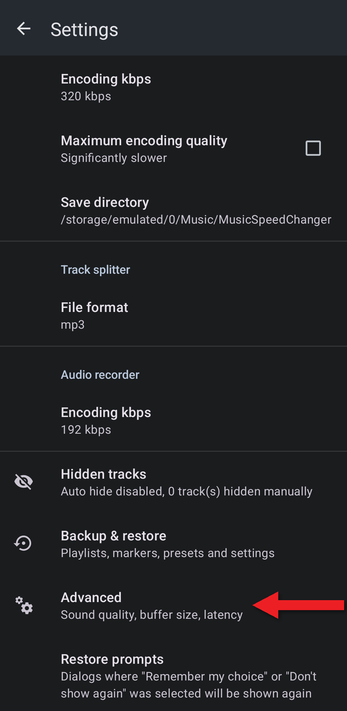
- Untick Use native audio library. (It's on by default because it improves the timing of loop and marker button presses.)
Music Speed Changer also has its own equalizer and audio effects, which work on every device and are included when you save edited tracks.
See Advanced Audio Settings: Sound Quality, Buffer Size and Latency for the other Advanced options.
How did we do?
Audio Effects: Vocal Reducer, Reverb, Echo and More
