Teaching Dance with Slowed-Down Music
Teach dance with slowed-down music in Music Speed Changer for Android: loop each section, lower the tempo, then build back up to full speed.

Music Speed Changer is a popular tool in dance studios. Dancers and dance teachers use it to slow music down while learning new steps. Complicated steps are much easier to learn when the instructor can demonstrate them in slow motion, still on the beat of the chosen music, and students can then repeat the choreography at the same pace. Because the music plays at the speed the students are learning, they get a real feel for how the steps fit the music.
Preparing Your Lesson with Markers
Before class, set a marker at the start of each section of the routine. Markers are bookmarks that the app remembers for each track, so you can jump straight to any section and turn any two markers into a loop. See Working with Markers.
Teaching a Section Step by Step
- Play the music at its original speed to show the students the whole dance they're going to learn.
- Set the A and B loop points around the first section you want to teach. See Setting and Editing A/B Loop Points.
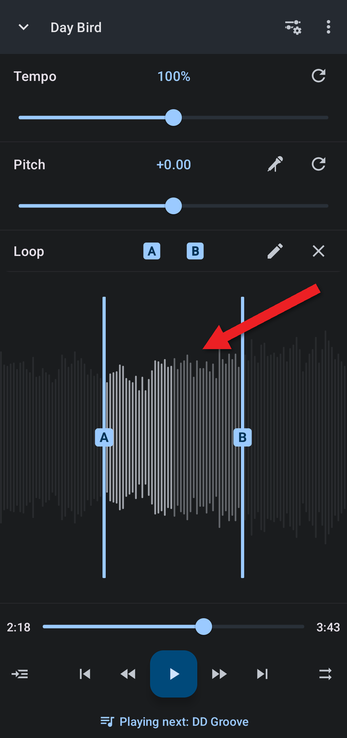
- Slow the tempo down with the Tempo slider, or tap the Tempo value to type an exact percentage. Start slow enough that the students can clearly follow each move with the music. Adjusting Pitch and Tempo Precisely explains the tempo options.
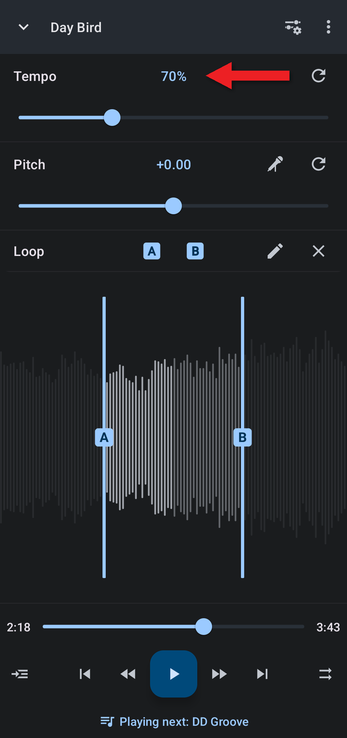
- As the students learn the steps, raise the tempo little by little until they can dance the section at full speed.
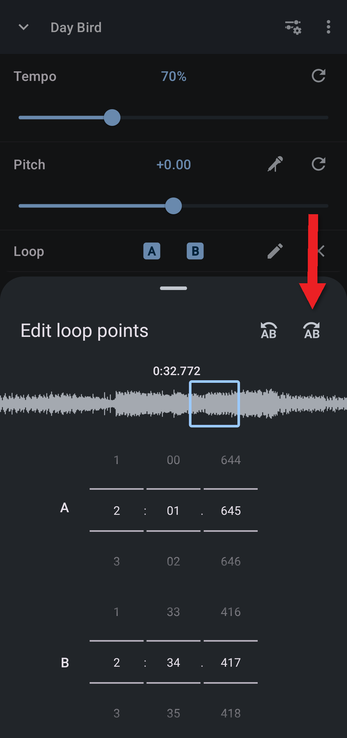
- Move the loop to the next section and repeat. Tap the loop's edit button to fine-tune the loop points, or use the skip buttons in the loop editor to move the whole loop forward by exactly one loop length.
Repeat until the whole piece is choreographed and the students can perform it at full speed.
How did we do?
Tips for Practicing a Musical Instrument
Music and Audio for TikTok and YouTube Videos
