Time Stretching to a Specific Duration
Time stretch music to an exact length with Music Speed Changer for Android: work out the tempo you need and save the stretched track.

Time stretching makes audio longer or shorter by changing its speed without changing its pitch, so there's no "chipmunk" or "Darth Vader" effect. It's handy in video production: you can stretch or shrink a piece of music or narration to fit an exact length for a YouTube, TikTok or commercial video. Music Speed Changer's Tempo control does the time stretching for you.
Working Out the Tempo You Need
The slower the audio, the longer it lasts; the faster the audio, the shorter it gets. To find the tempo that gives a particular length:
tempo % = original length ÷ new length × 100
Convert both lengths to seconds first (hours × 3600 + minutes × 60 + seconds). For example, to make a 3:30 track (210 seconds) fit into 3:00 (180 seconds), set the tempo to 210 ÷ 180 × 100 ≈ 116.67%. To stretch the same track to 4:00 (240 seconds), use 210 ÷ 240 × 100 = 87.5%.
The hard part of time stretching is the audio processing: keeping the pitch the same without audible artifacts. Music Speed Changer takes care of that.
Changing the Tempo in the Editor
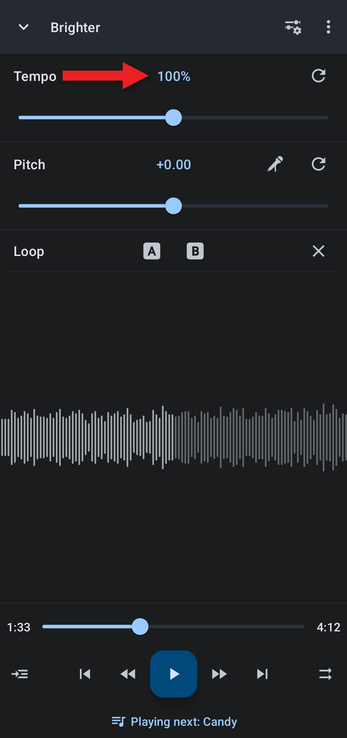
Open the track in the editor. You can drag the Tempo slider, but for an exact duration it's easier to type the value.
- Tap the Tempo value above the tempo slider.
- Type the tempo you calculated and tap OK.
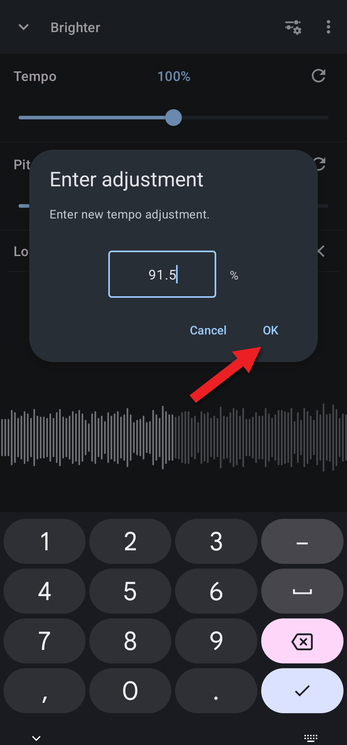
The editor shows the tempo rounded to a whole percent (91.5% appears as 92%), but the exact value you typed is used.
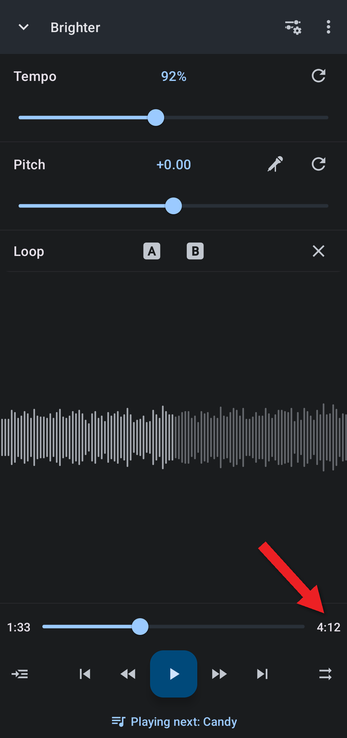
Only the tempo changes the length of the audio. You can still change the pitch, add effects, or get creative in other ways without affecting the duration.
Saving the Stretched Track
To use the stretched audio in a video editor or send it to someone, save it as a new file: tap the ⋮ menu at the top right of the editor and choose Save edited track…. Saving Edited Tracks has step-by-step instructions. You can then share the new file from the library or from My Creations.
How did we do?
Music and Audio for TikTok and YouTube Videos
Calculating and Changing the Rate of Music
