Making Nightcore
Make nightcore music with Music Speed Changer for Android: speed up and raise the pitch together, check the BPM, and save your nightcore track.


Classic Nightcore
A classic nightcore edit speeds up a track and raises its pitch at the same time, usually by 10–30%. Music Speed Changer makes it easy to create your own nightcore tracks, to save or share, and it can even play your whole library as nightcore.
- In the editor, tap the Editor components button (the sliders icon at the top right) and tick Join tempo and pitch. Tempo and pitch now move together on a single Rate slider.
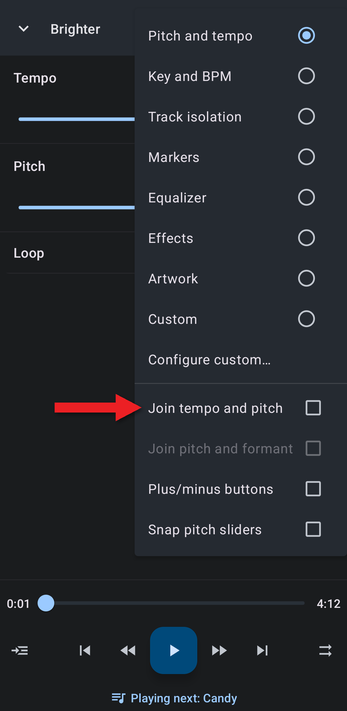
- Open the Editor components menu again and choose Key and BPM, so you can see the beats per minute (BPM) as you change the rate.
- Raise the rate until it sounds right to you. Nightcore is usually around 160 to 180 BPM, or about 110–130% of the original speed.
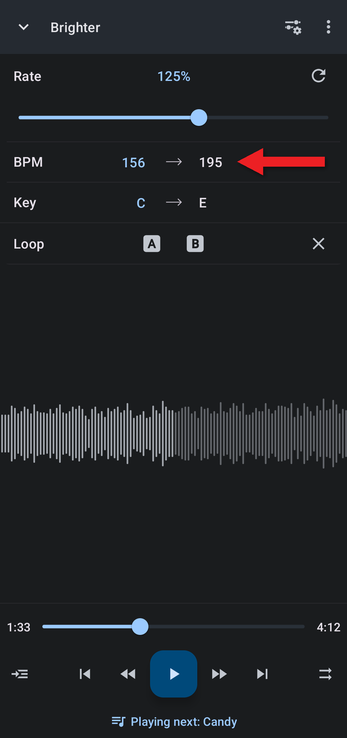
Computer BPM detection sometimes shows half or double the tempo a person would count. Detecting and Changing a Track's BPM explains how to correct it.
To make small, precise changes, tap the Rate value and type a number, or turn on the plus/minus buttons (see Adjusting Pitch and Tempo Precisely).
Playing Your Whole Library as Nightcore
By default, the rate stays the same when the next track starts, so everything you play comes out as nightcore. You can change this in Keeping or Resetting Adjustments When a New Track Loads. To keep a nightcore version of a track, save it as a new file.
Going Further
Music Speed Changer can also change pitch and tempo separately, so you can make a track as fast or slow, and as high or low, as you like. Add audio effects such as reverb or echo, and customize the editor to show just the controls you use.
How did we do?
Making Slowed + Reverb Music
